
Remind Me Get it on Google Play
ADHDPTSDTBIBusy brains

Say it once. It won’t slip away.

Remind Me turns what you say into to-dos, notes and reminders, and then keeps reminding you until it’s done. No typing, no setting times, nothing left to hold in your head.

Get it on Google Play Android · free for 30 days

Mission 2250% of our net profits go to Mission 22, supporting veterans’ mental health.

You say“Remind me to call the vet tomorrow at 3.”

To-do Call the vet Tomorrow · 3:00 PM · reminds you then
How it works

From a passing thought to a reminder, in one sentence.

  1. Say it

    Tap the big Listen button, or turn on Hands-free and just talk. Say it the way you’d tell a friend.

  2. It’s written down

    Remind Me picks out the to-do, the day and the time, even “every Tuesday” or “in 20 minutes”. Notes go to notes.

  3. It reminds you

    At the right time, with a sound you choose. Too busy right then? Snooze it. Still not done? It nudges you again.

See it

Simple enough for a hard day.

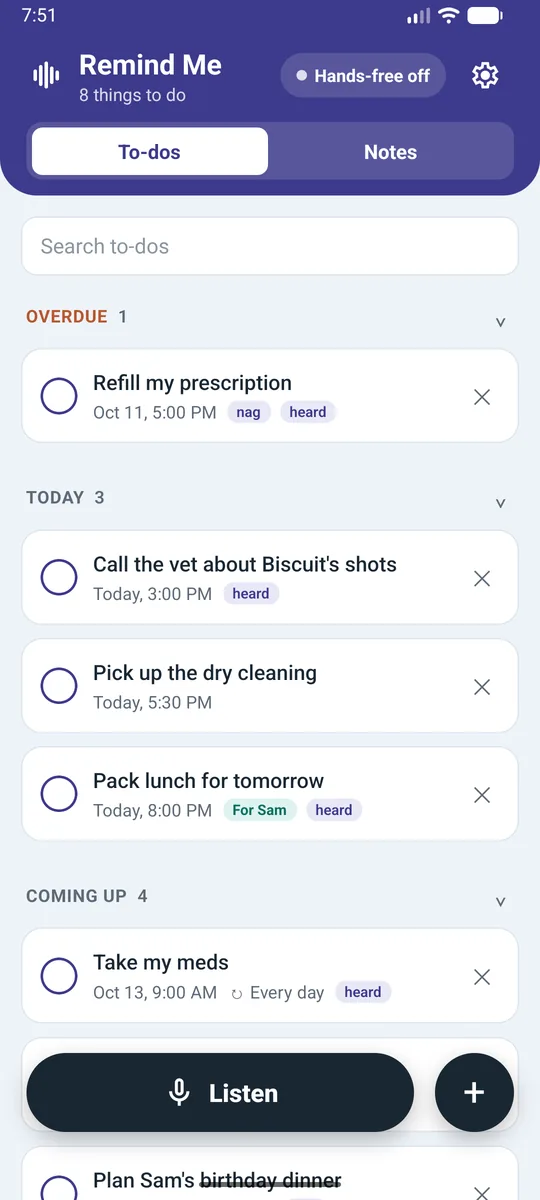
Home screen: to-dos grouped into Overdue, Today and Coming up, with a big Listen button
One look at your dayWhat's overdue, what's today, and what's coming up.
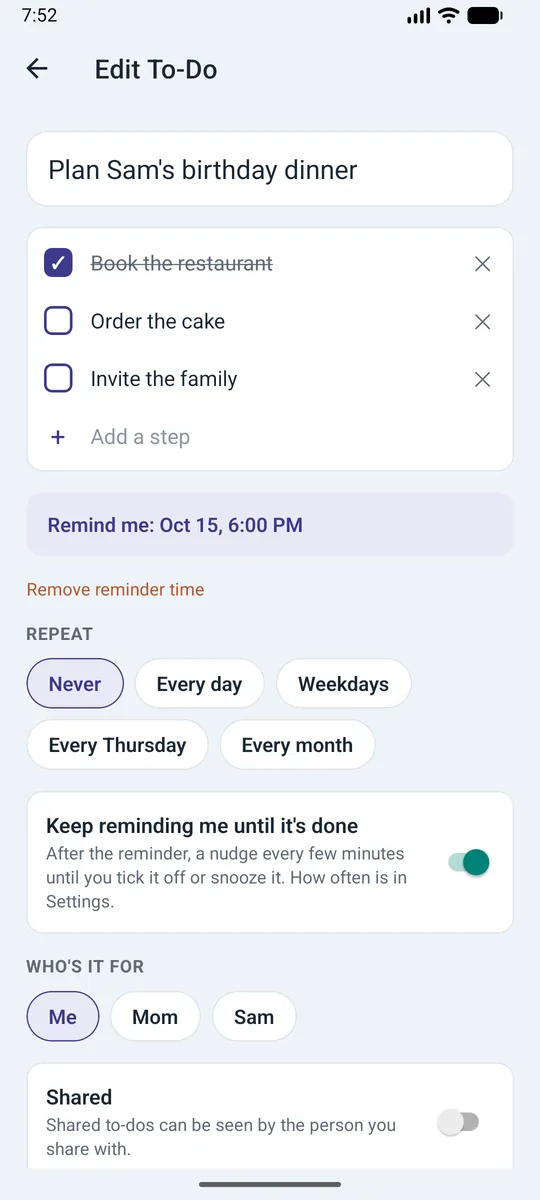
A to-do with a checklist of steps, repeat options and the keep-reminding switch
Big jobs, small stepsChecklists, repeats, and reminders that keep nudging until it's done.
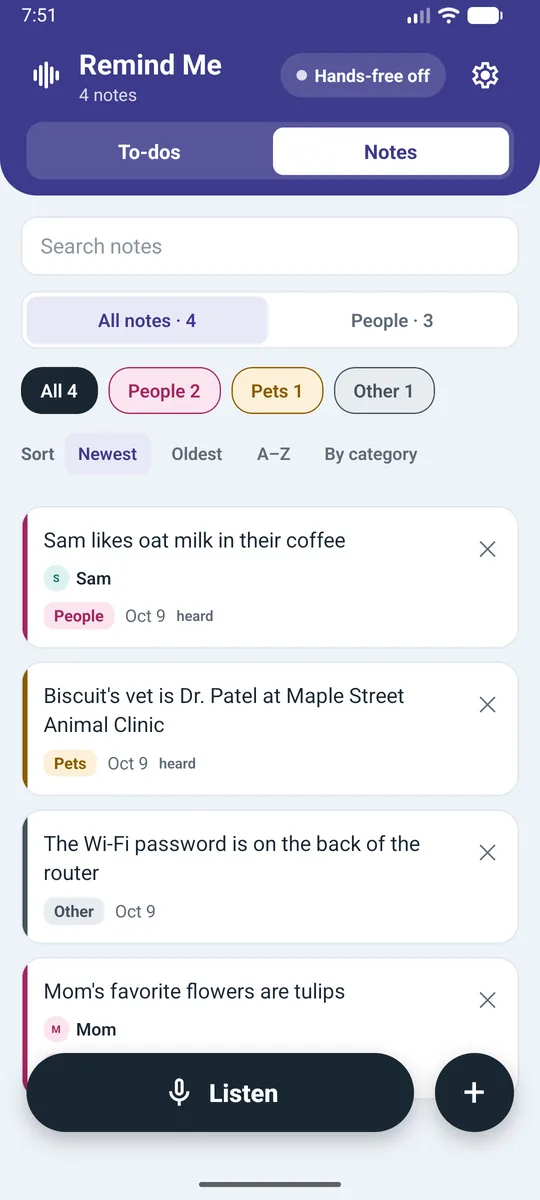
Notes filed into categories, with the people they're about
Notes that file themselvesSorted by topic, and linked to the people they're about.
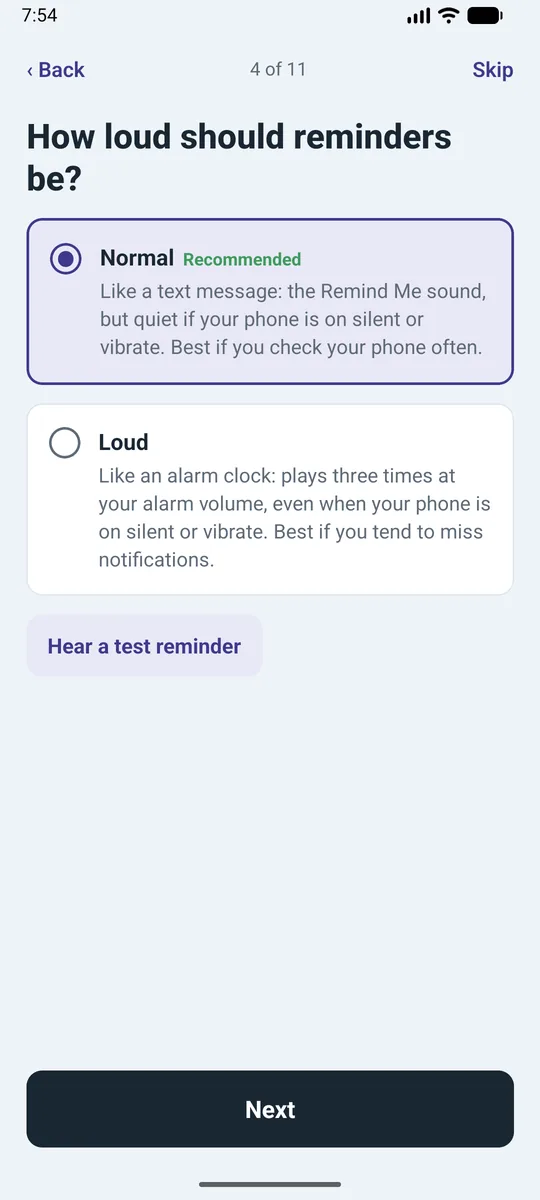
Setup page asking how loud reminders should be, with Normal and Loud explained
Setup in plain wordsEvery choice explained, one question at a time.
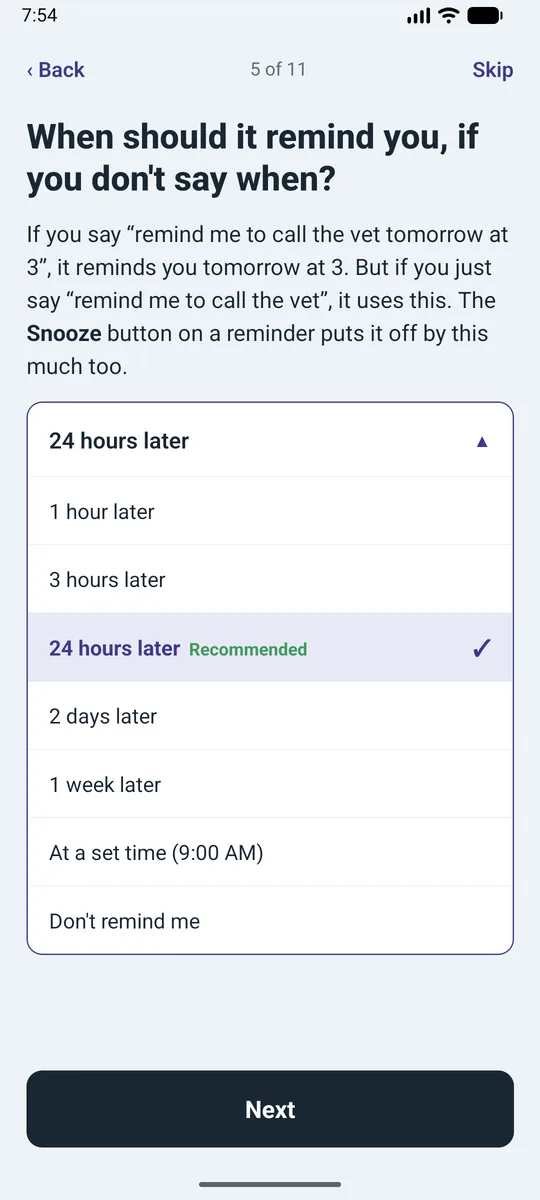
Setup page with a drop-down for when to remind you, Recommended marked
The right choice is already pickedNot sure? Keep the recommended one and tap Next.
Giving back · Proud partner of Mission 22

Half of our net profits go to Mission 22.

Remind Me was built by a disabled veteran, for people living with PTSD, TBI and ADHD. So 50% of its net profits go to Mission 22, supporting veterans’ mental health. Every subscription helps fellow veterans and their families.

Hands-free

No phone in your hand? It’s still listening for you.

Turn on Hands-free and Remind Me listens quietly in the background for a few phrases. When it hears one, it writes down what you say next and holds it for you to keep or delete, so a misheard sentence never becomes a reminder on its own.

“Remind me to…” “Don’t let me forget…” “I forgot to…” “Remind Sam to…” “Take a note…” “Note to self…”
Made for real life

Reminders that don’t let go.

Keep reminding me until it’s done

For the things that really matter: a nudge every 10 minutes (or 5, 15, 30), up to 12 times, until you tick it off.

Loud when you need it

Choose alarm-style reminders that ring even when your phone is on silent or vibrate.

A morning summary

One notification to start your day: what’s on today, what’s overdue, and whose birthday it is.

Repeats and checklists

“Take my meds every morning.” “Pay rent on the 1st.” Break big jobs into small steps you can tick off.

Share with a partner

Link two phones and say “remind Sam to pick up the dog food”. Sam gets to say yes or no first, so nobody is flooded.

Notes and people

“Take a note: Sam likes oat milk.” Notes are filed for you, and each person’s page keeps what you know about them.

Private by design

Your thoughts stay on your phone.

Remind Me hears some of the most personal things you say. So it was built to keep them where they belong.

No account

No sign-up, no email, no password. Open it and start talking.

Hands-free stays on the phone

Hands-free turns speech into text on your phone, and audio isn’t uploaded or kept. (The Listen button uses Google voice typing, like your keyboard’s microphone.)

No ads, no tracking

No analytics, and nothing about how you use the app is collected or sold.

Locked before it’s shared

If you share with a partner, items are encrypted on your phone first.

Read the full privacy policy

Built by someone who needed it.

Remind Me was made by a disabled veteran living with PTSD and ADHD. Thoughts arrive at the worst moments and are gone a minute later, and by the time you’ve opened an app and typed them in, they’re already lost.

So he built an app you just talk to. Every feature was tested in everyday family life first: the missed reminders, the ones that came at a bad moment, the ones that needed saying twice. If it didn’t help on a hard day, it didn’t make it in.

50% of Remind Me’s net profits go to Mission 22, supporting veterans’ mental health. Every subscription helps fellow veterans and their families.

Pricing

Simple pricing. Everything included.

Free for 30 days $5.99 / month after Or $49.99 a year (save 30%). Cancel anytime in Google Play. Couple’s plan: you and your partner for $10.99 a month or $89.99 a year.
  • Unlimited to-dos, notes and reminders
  • Hands-free listening
  • Keep-reminding, loud alarms and morning summary
  • Sharing with a partner
  • No ads, ever
  • 50% of net profits go to Mission 22, supporting veterans’ mental health

Get it on Google Play

Questions

Good to know

Is it always recording me?

No. Hands-free is off unless you turn it on. When it’s on, your phone listens for a few phrases, on the phone itself. Nothing is recorded or sent anywhere, and a notification shows the whole time it’s on.

Will it drain my battery?

Hands-free uses a little extra battery, because it only does its heavier work while someone is talking. If you’d rather not, use the Listen button instead; it uses no battery when you’re not using it.

Which phones does it work on?

Android phones running Android 7 or newer. Hands-free writes things down most accurately on Android 13 or newer. An iPhone version isn’t available yet.

What happens after the 30 days?

Remind Me is $5.99 a month, or $49.99 a year, after your 30 free days, billed by Google Play. The couple’s plan covers two people for $10.99 a month or $89.99 a year. Cancel any time before the 30 days end and you won’t be charged anything.

What if it mishears me?

Anything heard hands-free waits for you to keep, edit or delete it first. When you fix a word, it can learn the fix for next time, and you can teach it names and words it should know.

I’m not good with technology. Will I manage?

Yes. The first time you open it, a short walkthrough sets everything up one question at a time and explains each choice. The recommended choice is already picked.

Stay in the loop

Hear what’s new

News, the iPhone version, and how much has gone to Mission 22. A few emails a year, never shared or sold. Reply “stop” any time to be taken off.